
What are MCP servers and why do they matter for marketing automation? MCP servers (Model Context Protocol servers) represent a breakthrough in how AI systems connect to your marketing tools, databases, and workflows. Instead of building custom integrations for every combination of AI and data source, you implement MCP once and unlock an entire ecosystem.
This changes everything for marketing operations. Your AI can now access Google Drive, Slack, CRM data, analytics platforms, and publishing systems through one standardized protocol. The result: true marketing automation where AI handles complete workflows instead of just generating drafts.
At Azarian Growth Agency, we cover MCP servers extensively in webinar 16. You’ll see how we use MCP to automate our complete content workflow from competitive research through WordPress publishing.
Our AI marketing services include building custom MCP implementations that integrate with your existing SEO and webinar marketing operations. This guide explains what MCP servers are, how they work, and why they unlock marketing automation capabilities impossible with traditional AI tools.
The Integration Problem MCP Servers Solve
AI marketing tools have a fundamental limitation. They exist in isolation from your actual data and systems.
ChatGPT can write great copy, but can’t access your CRM to personalize it. Claude can analyze strategies, but can’t pull performance data from your analytics platform. AI writing tools can draft articles, but can’t publish them to WordPress or share them in Slack.
This isolation creates the N×M integration problem. Every AI tool needs a custom connector to every data source you use. Three AI tools plus five data sources equals fifteen separate integrations to build and maintain. Add more tools or data sources, and complexity explodes exponentially.
According to Anthropic’s announcement, before MCP, developers had to build custom connectors for each data source, making truly connected systems difficult to scale. Organizations were trapped between limited AI capabilities and unsustainable integration overhead.
The result: marketing teams use AI for isolated tasks like writing but can’t automate complete workflows. Humans still handle all the data gathering, context switching, and tool orchestration. The productivity gains stay limited.
MCP servers solve this by providing a universal protocol. Build one MCP integration and your AI connects to every MCP server. Build one MCP server for your data and every MCP client can access it. The N×M problem becomes N+M.
What MCP Servers Actually Are
MCP servers are programs that expose your tools and data to AI systems through a standardized interface.
Think of them like API servers but specifically designed for AI interactions. Instead of REST endpoints that developers call programmatically, MCP servers provide capabilities that AI systems discover and use automatically.
The Three Core Capabilities
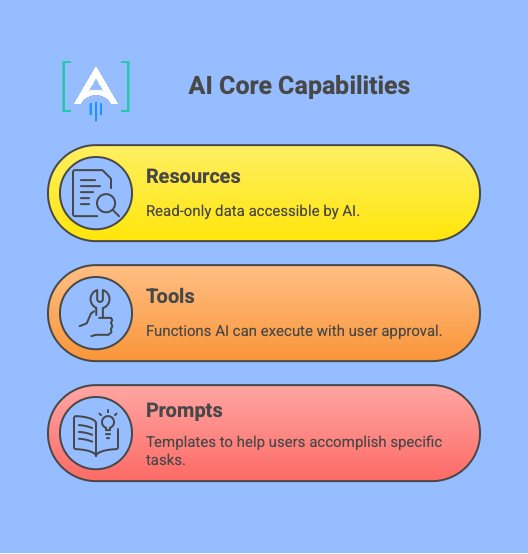
Resources: These expose read-only data that AI can access. A Google Drive MCP server provides resources for reading document content. A database MCP server provides resources for querying records. Resources are like file systems that AI can browse and read.
Tools: These are functions AI can execute with user approval. A WordPress MCP server provides tools for publishing articles, updating posts, and managing media. A Slack MCP server provides tools for sending messages and creating channels. Tools enable AI to take actions, not just read data.
Prompts: These are templates that help users accomplish specific tasks. An email MCP server might include prompts for “draft customer onboarding email” or “write product announcement.” Prompts package common workflows into reusable patterns.
How MCP Servers Communicate
MCP uses JSON RPC 2.0 as the underlying message format. This provides a standardized structure for requests, responses, and notifications between clients and servers.
The protocol supports two transport mechanisms:
STDIO: Standard input output for local servers running on your machine. This is how Claude Desktop connects to MCP servers installed locally. Fast and simple for development and personal use.
HTTP with SSE: HTTP for client requests and Server Sent Events for server responses and streaming. This enables remote MCP servers running in the cloud that multiple users can access. Essential for production deployments.
When a client connects to an MCP server, it first asks “What capabilities do you offer?” The server responds with its available tools, resources, and prompts. The client now knows what’s possible and can route user requests to appropriate servers automatically.
How MCP Servers Enable Marketing Automation
The real power of MCP servers emerges when you connect multiple servers together. AI can now orchestrate complete workflows spanning different tools and data sources.
Complete Content Workflow Automation
Traditional AI content tools help you write faster. MCP servers enable complete workflow automation from research through publication.
Our Content Engine uses MCP servers to automate the entire content production process:
Research MCP Server: Scrapes and analyzes 10 competitor articles automatically. Identifies common themes, content gaps, and differentiation opportunities. Returns structured research briefs in 2 minutes instead of 30 minutes manually.
WordPress MCP Server: Publishes finished articles directly to WordPress. Adds proper meta data, featured images, categories, and tags. Handles formatting and internal linking automatically. No manual copying and pasting between tools.
Analytics MCP Server: Tracks performance metrics automatically. Monitors rankings, traffic, and engagement for published articles. Feeds data back to inform future content strategy.
This workflow runs end to end with one human instruction: “Create an article about email marketing automation for B2B SaaS companies.” The AI handles research, writing, optimization, and publishing through orchestrated MCP server calls. Total time: 7 minutes versus 70 minutes manually.
According to Anthropic’s donation announcement, MCP now has 97M plus monthly SDK downloads across Python and TypeScript, demonstrating rapid enterprise adoption for exactly these automation use cases.
Multi-System Data Integration
MCP servers enable AI to pull context from multiple systems simultaneously, creating intelligence impossible with isolated tools.
CRM Plus Analytics Integration: AI accesses your CRM to identify high value prospects, then pulls website analytics to understand their engagement patterns, and then drafts personalized outreach combining both contexts.
Support Plus Knowledge Base Integration: AI reviews support tickets in your helpdesk system, identifies common issues, then checks your knowledge base to see if articles exist covering those topics, then drafts new articles for gaps.
Social Plus Content Integration: AI monitors social media conversations through one MCP server, identifies trending topics in your niche, then checks your content library through another MCP server to find relevant articles to share with timely commentary.
This multi system intelligence creates marketing automation capabilities that feel genuinely intelligent rather than just fast execution.
Scaling Marketing Operations With MCP Integration
MCP servers don’t just automate content. They transform complete marketing operations by connecting AI to every system in your stack.
SEO Workflow Automation: Our SEO services use MCP servers to automate competitive keyword research, content gap analysis, and technical audits. AI pulls ranking data, analyzes competitor strategies, and generates optimization recommendations automatically.
Webinar Campaign Orchestration: Through our webinar marketing services, we use MCP servers to connect registration data, CRM systems, and email platforms. AI personalizes follow-up sequences based on attendee behavior and engagement signals.
Signal-Based Outreach Integration: Our signal-based cold outreach services leverage MCP servers to monitor trigger events, enrich prospect data, and generate personalized messaging. AI identifies buying signals across multiple data sources and orchestrates timely outreach automatically.
Link Building Intelligence: Through link building services, MCP servers help AI identify link opportunities, analyze competitor backlink profiles, and draft personalized outreach at scale. Automation handles research while humans focus on relationship building.
Permission and Security Controls
MCP servers implement permission controls ensuring AI only accesses what you approve.
When AI wants to use a tool or access a resource, the client displays a permission prompt. You see exactly what the AI plans to do before it happens. You can approve, deny, or modify the request.
For resources, you can configure which data sources MCP servers can access. A Google Drive MCP server might only have permission to read specific folders. A database MCP server might only query certain tables.
For tools, you can configure which actions require approval. Publishing to WordPress might need confirmation every time. Reading documents might be auto approved after initial setup.
This granular control means you can safely give AI access to powerful capabilities without worrying about unauthorized actions.
Building vs Using Existing MCP Servers
You face two paths with MCP servers: build custom servers for your specific needs or use existing servers from the community.
When to Use Existing MCP Servers
The MCP ecosystem includes pre-built servers for popular platforms. Anthropic maintains reference implementations for Google Drive, Slack, GitHub, PostgreSQL, and more. The community has built hundreds of additional servers.
Use existing servers when:
Standard Integrations Suffice: You need typical functionality for common platforms. Reading Google Drive documents, sending Slack messages, querying databases. The reference servers handle these well.
Speed Matters More Than Customization: You want capabilities operational quickly. Installing an existing MCP server takes minutes. Building custom takes days or weeks.
You Lack Development Resources: Your team doesn’t include engineers comfortable building MCP servers. Using existing servers requires configuration, not programming.
According to Docker’s analysis, MCP servers are now available as Docker images, making installation even simpler. Developers can run reference servers by updating one configuration file.
When to Build Custom MCP Servers
Build custom MCP servers when your workflow requires capabilities beyond standard integrations.
Proprietary Systems: Your company uses internal tools without public APIs. A custom MCP server exposes these systems to AI through your own implementation.
Unique Workflows: Your process combines multiple steps in specific sequences. A custom MCP server packages this workflow as a single tool the AI can invoke.
Competitive Advantage: The automation you’re building creates defensible differentiation. A custom MCP server makes this capability exclusive to your operation.
Data Transformations: You need to process data in specific ways before AI consumes it. A custom MCP server handles transformation logic once rather than in every AI interaction.
We built custom MCP servers for Content Engine because our competitive research methodology and content gap analysis represent proprietary workflows. No existing server implements our specific approach. The custom servers became our differentiation, not just our tooling.
Implementing MCP Servers in Your Marketing Stack
Getting started with MCP servers requires understanding how they fit into your current marketing operations.
Installation for Claude Desktop
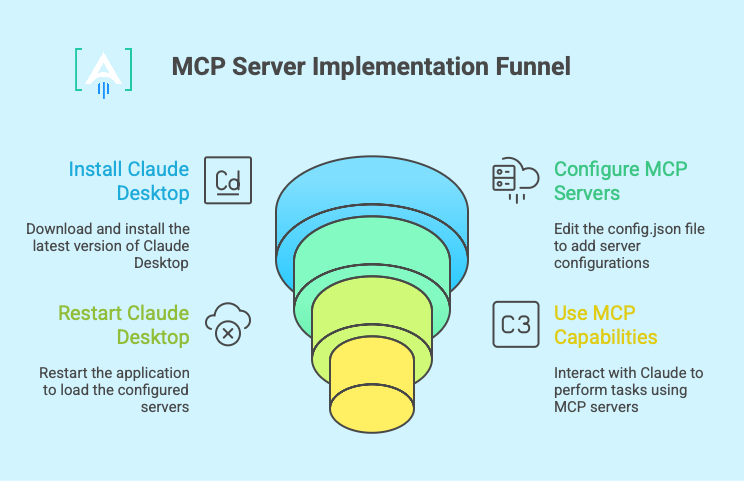
Claude Desktop provides the simplest MCP implementation for individual use and testing.
Step 1: Install Claude Desktop: Download from Anthropic’s website. Ensure you’re running the latest version for MCP support.
Step 2: Configure MCP Servers: Edit your claude desktop config.json file in your application support folder. Add server configurations specifying which MCP servers to connect.
Step 3: Restart Claude Desktop: The client loads configured servers on startup. You’ll see available tools and resources in Claude’s interface.
Step 4: Use MCP Capabilities: Ask Claude to perform tasks requiring external data or actions. It automatically routes requests to appropriate MCP servers with permission prompts.
For development and personal productivity, this setup works immediately. No hosting, no infrastructure, no complexity beyond editing one configuration file.
Production Deployment for Teams
Production MCP implementations require remote servers that multiple team members can access.
HTTP Transport Setup: Deploy MCP servers to cloud hosting with HTTP endpoints. Configure authentication using API keys or OAuth. Point multiple clients to the same server URLs.
Permission Management: Implement role based access controls. Different team members get different tool and resource permissions based on their responsibilities.
Monitoring and Logging: Track MCP server usage, performance, and errors. Monitor which tools get called, how often, and with what success rates. This data informs optimization.
Scaling Considerations: As usage grows, implement caching for frequently accessed resources. Load balance across multiple server instances. Optimize tool response times through async operations.
Our production Content Engine deployment uses remote MCP servers that our entire content team accesses. Writers, editors, and strategists all route requests through the same infrastructure with appropriate permissions for their roles.
Security Best Practices
MCP servers access sensitive data and perform important actions. Security implementation matters.
Authentication: Require strong authentication for MCP server access. Use API keys that rotate regularly. Implement OAuth for user specific permissions.
Authorization: Validate that requests come from authorized clients. Check that requested actions match user permissions. Log all access attempts for audit trails.
Input Validation: Sanitize all inputs to MCP tools. Prevent injection attacks through careful parameter checking. Validate data types and ranges before processing.
Rate Limiting: Implement rate limits preventing abuse. Throttle requests from individual users or clients. Protect backend systems from overload.
Prompt Injection Protection: MCP servers that fetch external content risk prompt injection attacks. Be especially careful with servers accessing user generated content or untrusted sources. Validate and sanitize before passing to AI.
Real World MCP Server Use Cases
Marketing teams are using MCP servers to automate workflows that were impossible with traditional AI tools.
Content Operations at Scale
Challenge: A B2B SaaS company needed to scale content production from 20 to 100 articles monthly without increasing headcount. Manual research consumed 30 minutes per article. Publishing required another 10 minutes of formatting and metadata entry.
MCP Solution: Built custom competitive research MCP server analyzing 10 competitor articles automatically. Used WordPress MCP server for one click publishing with proper formatting. Connected analytics MCP server tracking performance automatically.
Results: Production time dropped from 70 minutes to 7 minutes per article. Same three person team now produces 100 plus articles monthly. Quality metrics improved because AI research caught patterns humans missed reading sequentially.
Customer Data Integration
Challenge: A marketing agency needed to personalize outreach at scale. Campaign managers spent hours manually gathering prospect data from CRM, researching companies online, and checking engagement history before drafting emails.
MCP Solution: Connected Salesforce MCP server exposing customer data. Built custom research MCP server pulling company information from multiple sources. Used Gmail MCP server for draft creation with proper threading and formatting.
Results: Personalized outreach generation dropped from 45 minutes to 3 minutes per prospect. Campaign managers now handle 10x more prospects with higher response rates because personalization improved through better data integration.
Social Media Monitoring and Response
Challenge: A consumer brand needs to monitor social conversations and respond quickly with relevant content. Social media managers spent hours finding trending discussions, checking if existing content addressed those topics, and drafting responses.
MCP Solution: Built social listening MCP server monitoring brand mentions and relevant hashtags. Connected content library MCP server searching existing articles by topic. Used social publishing MCP server scheduling responses with appropriate content links.
Results: Response time improved from 4 hours to 15 minutes. Engagement increased 40% because responses included genuinely relevant content rather than generic replies. Social team capacity increased 5x.
Common Mistakes When Implementing MCP Servers
Teams adopting MCP servers make predictable mistakes that undermine results.
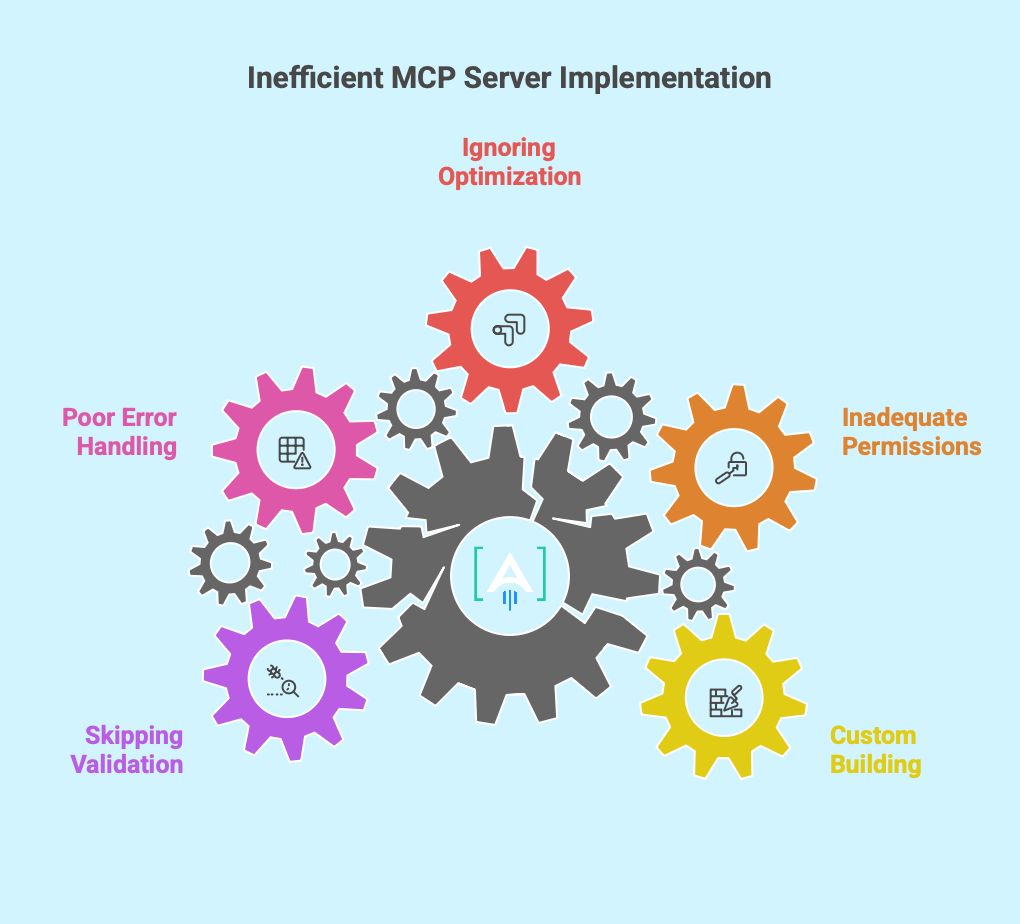
Mistake 1: Building Everything Custom
The instinct is building custom MCP servers for all capabilities. This wastes time on generic functionality that existing servers handle well.
Use reference servers for standard platforms. Google Drive, Slack, GitHub, databases. These work reliably and receive ongoing maintenance from the community.
Build custom only for proprietary workflows or competitive advantages. Focus development resources where uniqueness creates value.
Mistake 2: Inadequate Permission Controls
Giving AI broad access to tools and data without granular permissions creates security and quality risks.
Implement least privilege access. Grant only the specific permissions needed for intended use cases. Require approval for destructive actions. Auto approve only safe read operations.
Review permissions regularly as usage patterns evolve. Remove access no longer needed. Tighten controls based on audit log analysis.
Mistake 3: Ignoring Performance Optimization
MCP server response times directly impact user experience. Slow tools make AI feel sluggish and frustrating.
Optimize resource reading through caching. Prefetch commonly accessed data. Implement pagination for large result sets.
Optimize tool execution through async operations. Process long running actions in the background. Return status updates rather than blocking.
Monitor performance metrics. Track p50, p95, p99 response times. Investigate and optimize slow endpoints proactively.
Mistake 4: Poor Error Handling
MCP servers interact with external systems that fail unpredictably. Network issues, API rate limits, authentication expires, data not found.
Implement comprehensive error handling. Return clear error messages the AI can interpret and communicate to users. Include suggestions for resolution when possible.
Build retry logic with exponential backoff. Many errors are transient and succeed on retry. Avoid overwhelming failing services with immediate retries.
Log errors with full context for debugging. Include request parameters, user context, and error details. This enables rapid diagnosis when issues occur.
Mistake 5: Skipping Testing and Validation
MCP servers enable AI to take real actions affecting production systems. Testing before deployment prevents expensive mistakes.
Build test environments mirroring production. Validate MCP servers against test data before connecting to live systems.
Implement dry run modes for destructive operations. Let AI plan actions and show what would happen without executing. Useful for validating logic before enabling real execution.
Monitor early usage carefully. Watch how AI uses new MCP servers in practice. Adjust permissions and capabilities based on observed behavior rather than assumptions.
The Future of Marketing Automation With MCP
MCP servers represent the foundation for a new generation of marketing automation where AI truly handles complete workflows.
From Task Automation to Workflow Intelligence
Current marketing automation handles predefined sequences. Email nurture campaigns trigger based on specific actions. Social posts schedule according to calendars. Analytics dashboards update on fixed intervals.
MCP enabled automation becomes dynamic and intelligent. AI analyzes performance data, identifies underperforming segments, researches competitor approaches, generates improved content, tests variations, and implements winners automatically.
The workflow adapts based on results rather than following rigid rules. Human oversight shifts from executing tasks to defining objectives and constraints. AI handles the messy work of figuring out how to achieve goals given available data and tools.
Ecosystem Effects and Network Value
As more platforms build MCP servers, the value to users compounds. Each new integration makes existing capabilities more powerful through combinations.
Adding a CRM MCP server makes content MCP servers more valuable because AI can now personalize based on customer data. Adding analytics MCP servers makes both more valuable because AI can optimize content and targeting based on performance data.
This creates network effects similar to communication platforms. The first MCP server you connect has limited value. The tenth MCP server makes the first nine dramatically more useful through combinatorial workflows.
Competitive Advantage Through Custom Servers
Companies building proprietary MCP servers for their unique workflows gain defensible advantages.
Your competitors can use the same AI models and the same reference MCP servers. Everyone has access to ChatGPT, Claude, Google Drive, and Slack integrations.
But custom MCP servers implementing your specific methodology, accessing your proprietary data, and automating your unique processes create differentiation competitors can’t replicate by subscribing to the same SaaS tools.
This shifts competitive advantage from what tools you buy to what automations you build. Technical capability becomes strategic capability.
Getting Started This Week
You don’t need to transform your entire marketing operation immediately. Start with one high value workflow to prove the MCP approach.
Week 1: Install Claude Desktop and Reference Servers
Set up Claude Desktop on your machine. Configure one or two reference MCP servers for platforms you already use. Google Drive, Slack, or your database. Test basic functionality by asking Claude to access and work with data from these servers.
Week 2: Identify Your Highest Pain Point Workflow
Map your most time consuming manual workflow involving multiple tools and data sources. Calculate current time investment and cost. This becomes your first automation target and ROI baseline.
Week 3: Design MCP Server Architecture
Determine which MCP servers you need for your workflow. Which exist already and which require custom development? Sketch how AI will orchestrate server calls to complete the workflow. Identify permission and security requirements.
Week 4: Implement and Test First Automation
Connect the MCP servers needed for your workflow. Build custom servers for gaps if necessary. Test the complete process with small data sets before scaling. Measure time savings and quality compared to manual execution.
Most teams see 50 to 70% time reductions on their first MCP automated workflow. This success builds organizational confidence for expanding to additional use cases.
Conclusion
At [A] Growth Agency we built content engines using MCP servers to automate content production from competitive research through WordPress publishing. Our three person team produces 100 plus articles monthly in 7 minutes per article versus 70 minutes manually. Quality metrics improved because systematic AI research catches patterns humans miss.
The question isn’t whether MCP automation works. The data proves it does. The question is how quickly you’ll implement it before competitors gain production velocity advantages.
We walk through our complete MCP implementation in webinar 16 including live demonstrations of custom server development, workflow orchestration, and security configuration. You’ll see our exact architecture handling 100 plus articles monthly with sub 10 second response times.
We built our own MCP servers for Content Engine and use them daily in production. We understand real implementation challenges because we’ve solved them for our own operation first.
Ready to implement MCP servers for marketing automation?
Talk to our growth experts to discuss your specific workflows and goals.