

You are spending real money on paid media. The leads are coming in. The CRM is logging them. The dashboard looks fine.
And 65% of those leads never received a single follow-up email.
Not because your team dropped the ball. Not because your copy was wrong. Because one CRM field had the wrong default value. And nobody caught it for months.
This is the most common revenue leak we find inside PE-backed portfolio companies, and it is almost never visible from the outside. The marketing team sees lead volume. The sales team sees their queue.
Nobody sees the gap between those two views, where hundreds of leads are quietly aging out of your funnel without ever being touched.
This article covers what causes lead follow-up automation failure at the infrastructure level, how to audit your CRM in 20 minutes, what a correctly built routing workflow looks like, and what the financial impact actually is when this problem goes undetected.
The Lead Follow-Up Problem Is Larger Than You Think
Most executives assume their CRM is routing and following up on leads correctly. They assume this because nobody has told them otherwise, not because anyone has checked.
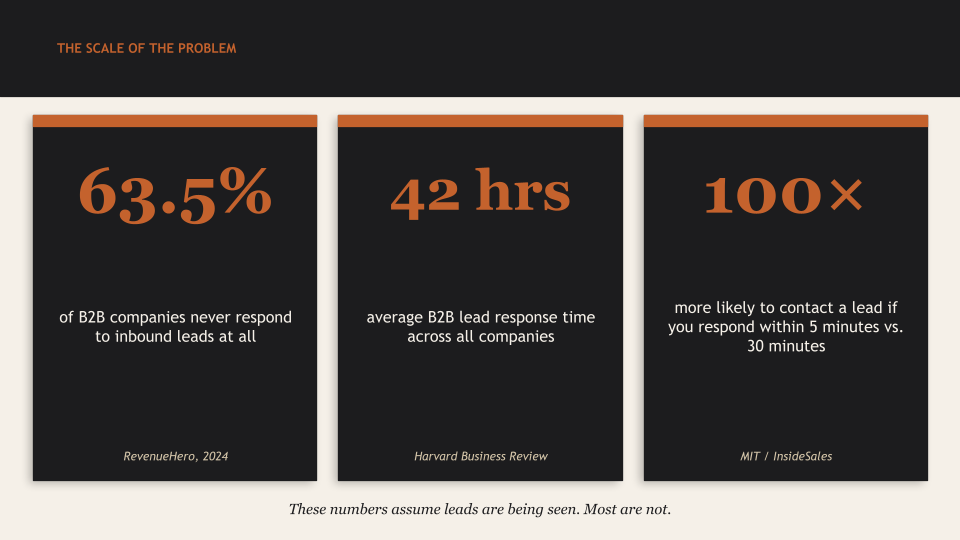
A 2024 study by RevenueHero, auditing more than 1,000 B2B companies, found that 63.5% never responded to inbound leads at all. The average response time among those who did respond was 29 hours.
The benchmark that established this field comes from an MIT and InsideSales research study authored by Dr. James Oldroyd and David Elkington. Their core finding: contacting a lead within 5 minutes is 100 times more likely to result in contact and 21 times more likely to result in qualification compared to waiting 30 minutes. That multiplier collapses within the first hour.
The Harvard Business Review validated this with a study of 1.25 million online sales leads across 2,241 companies. Firms that responded within one hour were nearly 7 times more likely to qualify a lead. The average response time was 42 hours. More than 23% of companies never responded at all.
That was 2011. By 2024, the problem had worsened considerably despite a decade of CRM adoption and marketing automation investment. The tools are in place. The data is entering the system. The follow-up is not happening. And in the majority of cases we see, the cause is not a people problem.
It is a configuration problem.
What CRM Configuration Errors Actually Look Like
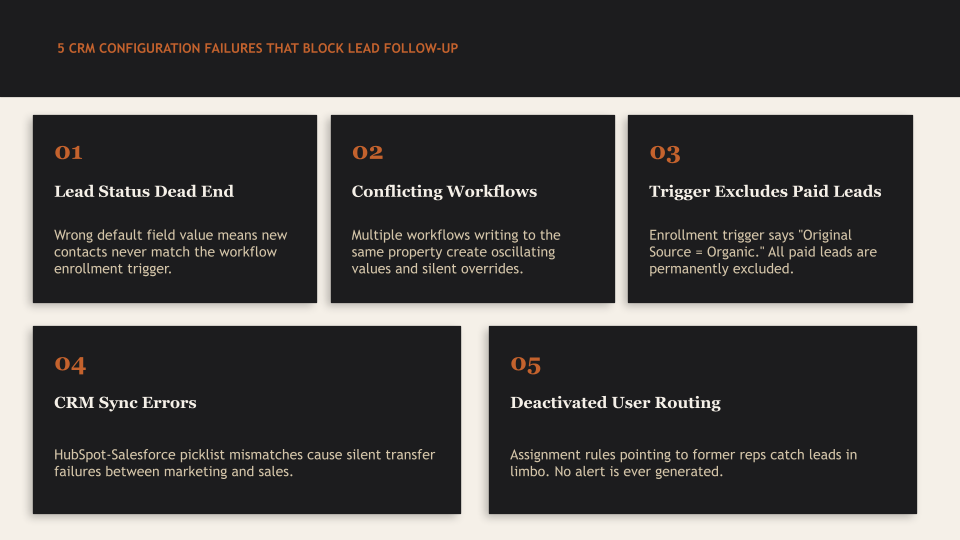
The phrase “CRM configuration error” sounds technical. In practice, the most damaging errors are deceptively simple. Here are the failure patterns we encounter most frequently when running a Strategic Growth Diagnostic inside a portfolio company marketing stack.
1. The Lead Status Dead End
This is the failure mode that produced the finding in this article title. A lead submits a form. The CRM creates a contact record. A workflow is supposed to fire, enroll the contact in a nurture sequence, and notify a sales rep. None of that happens.
The cause: the Lead Status field has a default value of “Unqualified” instead of “New” or “Lead.” The enrollment trigger on the workflow says: enroll contacts when Lead Status equals “New.” The new contact never matches the trigger. The workflow never fires. The lead sits in the CRM, receiving nothing, until the data decays.
This is not an unusual edge case. Research from LeanData found that 25.5% of marketing-generated leads are misrouted, and that 73% of MQLs are never contacted at all. A single field default is often the entire explanation.
The fix takes 20 minutes. Correcting the field default and re-triggering the workflow for the dormant contact pool is the work of a CRM admin on a Tuesday morning. The problem is that nobody ran the query to find it.
2. Conflicting Workflows Overwriting Each Other
Portfolio companies that have been running HubSpot or Salesforce for several years accumulate workflows. Workflows built during onboarding. Workflows built by the previous marketing hire. Workflows built by the agency before they were replaced. Each one made sense in isolation at the time it was created.
The problem: multiple workflows writing to the same property create oscillating values and silent overrides. Workflow A sets Lifecycle Stage to “Marketing Qualified Lead.” Workflow B, built six months later, sets Lifecycle Stage to “Subscriber” for any contact without a deal.
Contact enters Workflow A, gets promoted, immediately gets demoted by Workflow B, falls out of the sales routing queue, receives no follow-up.
The contact never leaves HubSpot. The system reports it as active. The lead is functionally unreachable.
3. Enrollment Triggers That Exclude Your Primary Lead Source
A company runs paid search across Google and Meta. Their highest-volume lead source is a landing page connected to a Google Ads campaign. Their lead nurture workflow enrolls contacts when “Original Source equals Organic Search.” Paid leads have an Original Source of “Paid Search.”
Every paid lead the company generates is excluded from nurture. Not intentionally. The workflow was built when the company was primarily organic. Nobody updated the trigger when paid media became the primary acquisition channel.
This specific pattern is a frequently cited HubSpot workflow misconfiguration, and it produces exactly the outcome described: leads enter the system, appear in reports, and receive zero marketing contact.
4. CRM-to-Marketing Automation Integration Sync Failures
For companies running HubSpot and Salesforce in parallel, sync errors between the two platforms silently break lead routing. The most common cause: picklist value mismatches. A Lead Status value that exists in HubSpot does not exist in Salesforce. The sync fails. The record does not transfer. The lead sits in HubSpot, never reaching the sales team operating out of Salesforce.
HubSpot and Salesforce sync on a 15-minute cycle. API call limit exhaustion, field validation failures, and object association mismatches all produce silent failures that appear nowhere in standard CRM reporting. The only place these errors surface is inside the integration error log, which most teams check only when someone notices a problem. By that time, the leads are weeks old.
5. Routing Rules That Reference Deactivated Users
This failure mode is common at companies with any amount of sales team turnover. Salesforce assignment rules reference specific users. When a rep leaves and their account is deactivated, any rule assigning leads to that user breaks. Leads route to nobody. No error is thrown. The rule shows as active.
At a company with 12 months of normal sales turnover, it is not unusual to find routing rules pointing to three or four deactivated accounts. Every lead matching those rules has been silently unrouted since each departure date.
The Financial Cost of a Lead Follow-Up Failure
The financial impact of systematic lead routing failures is significant and calculable. Here is a conservative model for a PE-backed company generating $40 million to $60 million in revenue with $1.5 million to $2 million in annual marketing spend.
| Failure Category | Annual Revenue Impact | Primary Cause |
| Paid leads never contacted (65% unworked) | $700K to $1.8M | CRM field mapping or workflow trigger error |
| Leads routed to wrong rep or no rep (25% misrouted) | $300K to $600K | Deactivated users, broken assignment rules |
| Media waste from targeting degraded records | $280K to $420K | 22%+ annual data decay, no hygiene process |
| Lost sales productivity on bad data | $150K to $320K | 27% of rep time wasted on unworkable contacts |
| TOTAL ESTIMATED ANNUAL LEAKAGE | $1.4M+ per year | Before opportunity cost of delayed growth |
Bad data does not just affect one quarter. Gartner estimates organizations lose an average of $12.9 million annually from poor data quality. For smaller portfolio companies, Forrester puts the number at $1.2 million per year for midsize organizations from wasted media spend alone.
The compounding effect matters at the board level. A company spending $2 million per year on marketing that is losing 30% of that to configuration failures and unworked leads is not just losing $600,000 annually. It is also failing to build the revenue trajectory that justifies the spend. When the board asks “What is our cost to acquire a customer?” and the answer does not account for the 65% of leads that received no follow-up, the CAC number being reported is structurally wrong. Every budget decision downstream of that number is also wrong.
Why Nobody Sees This Until Someone Looks Specifically for It
The structural reason these failures persist is that the data required to catch them lives in two separate places, and no one person owns both views.
The marketing team sees lead volume in their platform. The CRM shows contacts created. Reports look like leads are flowing. Nobody has built a report that shows what percentage of those contacts progressed to the next stage. A contact created is not a contact followed up. Those are different data points, and most marketing teams only track the first one.
The sales team sees their queue. Leads that route correctly appear there. Leads blocked by a field default never appear. Sales is not waiting for leads that never arrive. They are working the leads they can see. The gap between “leads created” and “leads that reached the queue” is invisible to everyone operating inside the system.
The data decay rate accelerates this problem. B2B contact data now decays at approximately 70% annually, meaning the leads that routed incorrectly three months ago may now have stale email addresses, inactive phone numbers, or contacts who have moved roles. By the time someone notices the routing error, a significant portion of the affected leads are no longer reachable.
The 1-10-100 rule of data quality applies directly: it costs $1 to verify data at point of entry, $10 to correct it after the fact, and $100 if the error is left unaddressed. A routing misconfiguration that runs for six months at $100 per lead in unrecoverable pipeline is the most expensive failure mode in B2B marketing, and it is also the most preventable.
How to Audit Your CRM Lead Routing in 20 Minutes
This is not a theoretical framework. It is the first set of checks we run at the start of every Strategic Growth Diagnostic. You do not need a consultant to execute this. You need a CRM admin and 20 minutes of focused attention.
Minutes 1 Through 5: Test the Pipeline Live
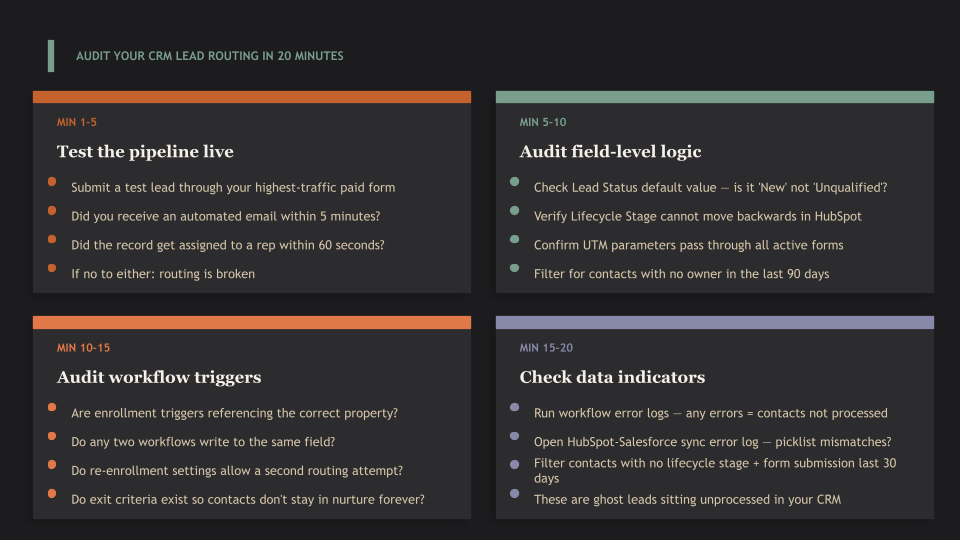
Submit a test lead through your highest-traffic paid form. Use a new email address not already in the system. Start a timer. Track what happens:
- Does a contact record get created immediately?
- Does the contact receive a lifecycle stage and a lead status within 60 seconds?
- Does a sales rep receive a notification?
- Does the contact receive an automated email within 5 minutes?
If any of these four things do not happen, you have found a routing failure. This single test catches the majority of broken configurations without any technical investigation.
Minutes 5 Through 10: Audit Field-Level Routing Logic
Open your CRM and check the following fields for every active lead routing workflow:
- Lead Status: Verify that all picklist values are current and that every status value triggers a corresponding workflow action. Any status value with no downstream action is a dead end.
- Lifecycle Stage: In HubSpot, lifecycle stages cannot move backwards by default. Any workflow attempting to set a contact to an earlier stage fails silently. Check your workflow logs for this specific error.
- Lead Source or UTM mapping: Verify that paid lead sources map correctly to CRM fields. The most common failure here is UTM parameters not passing through form submissions, resulting in “Direct Traffic” attribution and exclusion from paid-source workflows.
- Owner assignment: Run a filter for contacts created in the last 90 days with no owner. Any result indicates a routing gap. Then check assignment rules to see whether any reference a deactivated user.
Minutes 10 Through 15: Audit Workflow Enrollment Triggers
Open your primary lead routing workflow. Check the enrollment trigger conditions. The most common question to ask: is this trigger based on the right property? For example, is the trigger set to “Lifecycle stage is Marketing Qualified Lead” when the workflow fires on “Lead status is New”? These two fields are not the same. Enrollment trigger mismatches are the most common HubSpot workflow error we encounter.
Also check:
- Re-enrollment settings: Can contacts re-enter the workflow if their properties change? If not, a contact who failed routing the first time will never receive a second attempt.
- Exit criteria: If no exit criteria exist, contacts may remain enrolled in a nurture sequence indefinitely, receiving outdated content long after they should have been progressed or removed.
- Conflicting workflows: Search for any other workflows that write to the same properties as your routing workflow. Multiple workflows updating lifecycle stage is the single most common source of oscillating values and silent routing failures.
Minutes 15 Through 20: Check Data Quality Indicators
Run these four queries in your CRM. Each one surfaces a different category of routing failure. Comprehensive HubSpot audit checklists recommend running these quarterly at a minimum.
- Contacts with no owner AND created date within the last 60 days: these are unrouted leads.
- Contacts with no lifecycle stage AND form submission within the last 30 days: these are leads that entered the system but were never processed.
- Active workflows with error logs: go to Settings, then Workflows, then open your routing workflows and check the Errors tab. Any errors listed represent contacts who did not process correctly.
- Integration sync errors: if running HubSpot and Salesforce together, go to Settings, then Integrations, then Salesforce, then Sync Errors. Picklist value mismatches and field validation failures are the most common entries.
What a Correctly Built Lead Routing Architecture Looks Like
A functioning lead routing system separates its logic across three distinct workflows. Combining these into one creates debugging nightmares and silent failures.
Workflow One: Classification
The classification workflow runs first. Its job is to score the lead based on fit and intent signals and assign the appropriate segment label. It does not route. It does not nurture. It only classifies.
Fit signals include: company size, industry, annual revenue, tech stack. Intent signals include: specific page visits (pricing page, demo page), content downloads, repeat visits within a short window.
The workflow output is a segment label written to a custom property. That label is what triggers routing.
Workflow Two: Routing
The routing workflow enrolls contacts when the classification property is set. It assigns an owner, notifies the correct rep, sets a lead status of “New,” and writes a timestamp to a custom property called “Date Routed.” That timestamp creates the audit trail required to measure speed-to-lead.
Every routing workflow should have a fallback branch: if no assignment rule matches, route to a designated inbox owner rather than leaving the record unowned.
The industry standard for B2B lead follow-up SLA is contact within five minutes for high-intent leads. Responding within one hour produces 7 times higher qualification rates versus waiting until the following business day. Most companies operating without a functioning routing workflow are measuring their response time in days, not minutes.
Workflow Three: Nurture
The nurture workflow enrolls contacts who are not yet sales-ready based on their classification label. It runs a multi-step email sequence calibrated to the segment.
Companies that run properly structured nurture sequences generate 50% more sales-ready leads at 33% lower cost compared to companies that send all leads directly to sales. Nurtured leads also make 47% larger purchases on average. The value is not theoretical. It shows up in revenue and in deal size.
The nurture workflow should have clear exit criteria: when a contact reaches the lead scoring threshold, it exits nurture and triggers the routing workflow. That transition is the scored-to-owned handoff, and it is where most companies lose pipeline. The lead gets scored. No handoff workflow fires. The scored lead sits in a nurture sequence receiving content rather than reaching a sales rep.
The Lead Follow-Up Audit Checklist
Use this checklist to run your own assessment. Every “No” or “Unknown” answer identifies a gap in your lead routing infrastructure.
| Audit Area | Check | Status |
| Live test | Test lead received confirmation email within 5 minutes | Yes / No / Unknown |
| Live test | Test lead assigned to an owner within 60 seconds | Yes / No / Unknown |
| Field mapping | Lead Status default value is “New” or equivalent active state | Yes / No / Unknown |
| Field mapping | Lifecycle Stage workflow cannot move contacts backwards | Yes / No / Unknown |
| Field mapping | Paid lead source maps correctly to Original Source field | Yes / No / Unknown |
| Field mapping | UTM parameters pass through to CRM from all active forms | Yes / No / Unknown |
| Assignment rules | No active assignment rule references a deactivated user | Yes / No / Unknown |
| Assignment rules | Fallback routing exists for leads that match no rule | Yes / No / Unknown |
| Workflow logic | No two active workflows write to the same property | Yes / No / Unknown |
| Workflow logic | All enrollment triggers reference current, active picklist values | Yes / No / Unknown |
| Workflow logic | Workflow error logs show zero errors in the past 30 days | Yes / No / Unknown |
| Integration | HubSpot-Salesforce sync error log is clear | Yes / No / Unknown |
| Integration | All picklist values are aligned across both platforms | Yes / No / Unknown |
| Data quality | No contacts created in the past 60 days have no owner | Yes / No / Unknown |
| Data quality | No form submissions in the past 30 days have no lifecycle stage | Yes / No / Unknown |
| Nurture | All active nurture sequences have functioning exit criteria | Yes / No / Unknown |
| Nurture | Scored leads that cross the MQL threshold trigger a routing workflow | Yes / No / Unknown |
| Performance | Average speed-to-lead is measured and tracked weekly | Yes / No / Unknown |
A company that can answer “Yes” to all 18 checks has a functioning lead routing infrastructure. In our diagnostic experience, the average portfolio company with $20 million or more in revenue can answer “Yes” to fewer than 8 of these. The remaining gaps represent unworked leads, misrouted pipeline, and revenue that is not appearing on any report because it never entered the funnel.
About Azarian Growth Agency
Azarian Growth Agency helps growth-stage and PE-backed companies figure out why their marketing is not converting to revenue, then fixes it.
The lead routing failure described in this article is one of the most common findings in our Strategic Growth Diagnostic. When we go system-deep inside a portfolio company marketing stack, we are not reviewing dashboards. We are inside the CRM back end, checking field defaults, pulling workflow enrollment logs, tracing individual leads through the full routing sequence from form submission to sales assignment.
That level of access is what separates a diagnostic from an audit. An audit reviews reports. A diagnostic follows the data to find what the reports do not show.
Our Strategic Growth Diagnostic takes four to eight weeks and delivers a prioritized roadmap of 150 to 200 findings organized by dollar impact and implementation complexity. Quick wins identified during the diagnostic are addressed immediately. In a typical engagement, we find at least one infrastructure failure in the first two weeks that the internal team had no visibility into.
Following the diagnostic, companies have the option to move into a Fractional CMO engagement where Azarian Growth Agency implements the roadmap, manages vendor accountability, builds attribution infrastructure, and provides ongoing strategic leadership at a fraction of the cost and timeline of a full-time CMO hire.
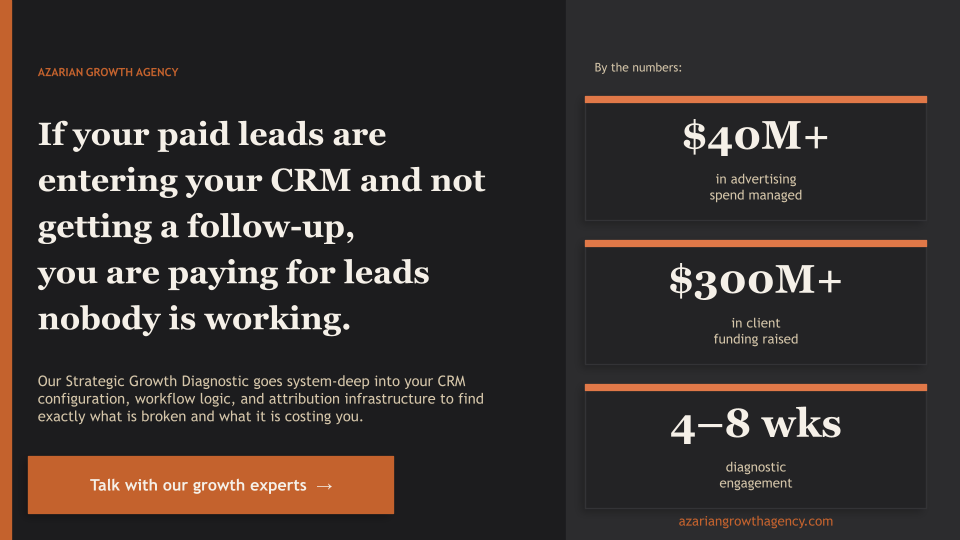
Azarian Growth Agency has managed over $40 million in advertising spend and supported companies that have raised over $269 million in funding. Our diagnostic methodology has been validated across multiple PE-backed engagements in financial services, insurance, fintech, healthcare, and B2B SaaS.
If your portfolio company is spending money on paid media and cannot confirm with certainty that every lead is receiving a follow-up within five minutes, a conversation costs nothing.
Talk with our growth experts or learn more about our Strategic Growth Diagnostic to understand what a system-deep assessment of your marketing infrastructure would cover and what it typically uncovers.